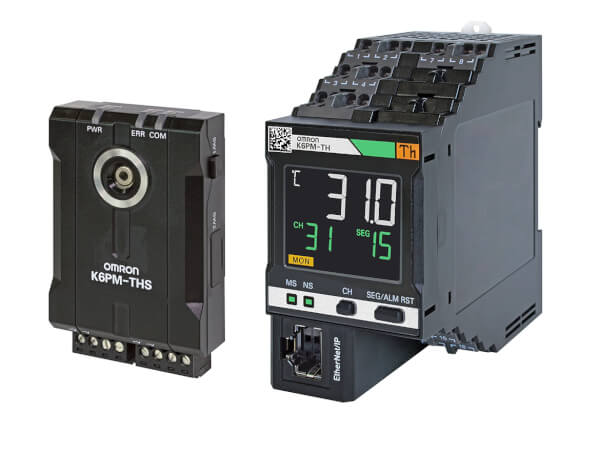
K6PM-TH
Monitorowanie stanu w oparciu o termografię
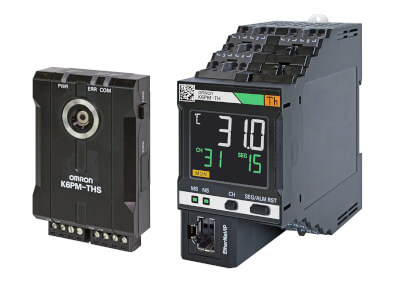
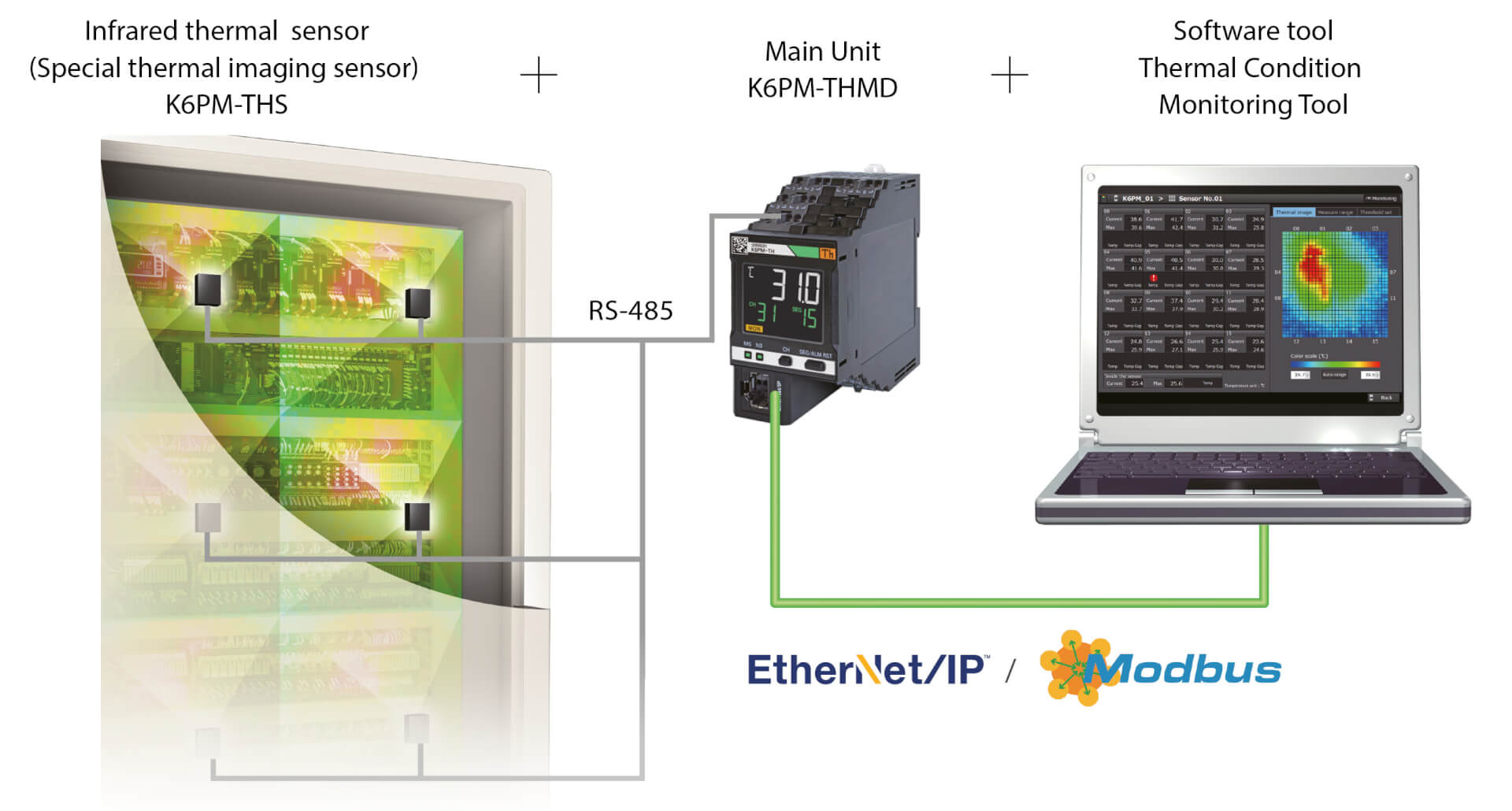
K6PM-TH mierzy i monitoruje temperaturę powierzchni za pomocą maksymalnie 31 dołączonych kamer podczerwieni, jako ciągłą termografię.
- Monitorowanie i przewidywanie trendu temperatury, sygnalizując alarm zawsze, gdy temperatura danego obszaru przekracza ustawiony próg lub oczekuje się, że w niedalekiej przyszłości osiągnie wartość krytyczną
- Uwzględnianie trendu różnicy temperatur (pomiędzy środowiskiem a mierzonym obiektem), sygnalizując alarmy tylko w przypadku wystąpienia krytycznych warunków.
- Automatyczne ustawianie progu temperatury dla każdego obszaru (każda kamera dzieli monitorowany obszar na 16 kwadrantów) w oparciu o warunki odniesienia
- Powiadomienia e-mail w przypadku ostrzeżenia/alarmu
- Zdalne monitorowanie
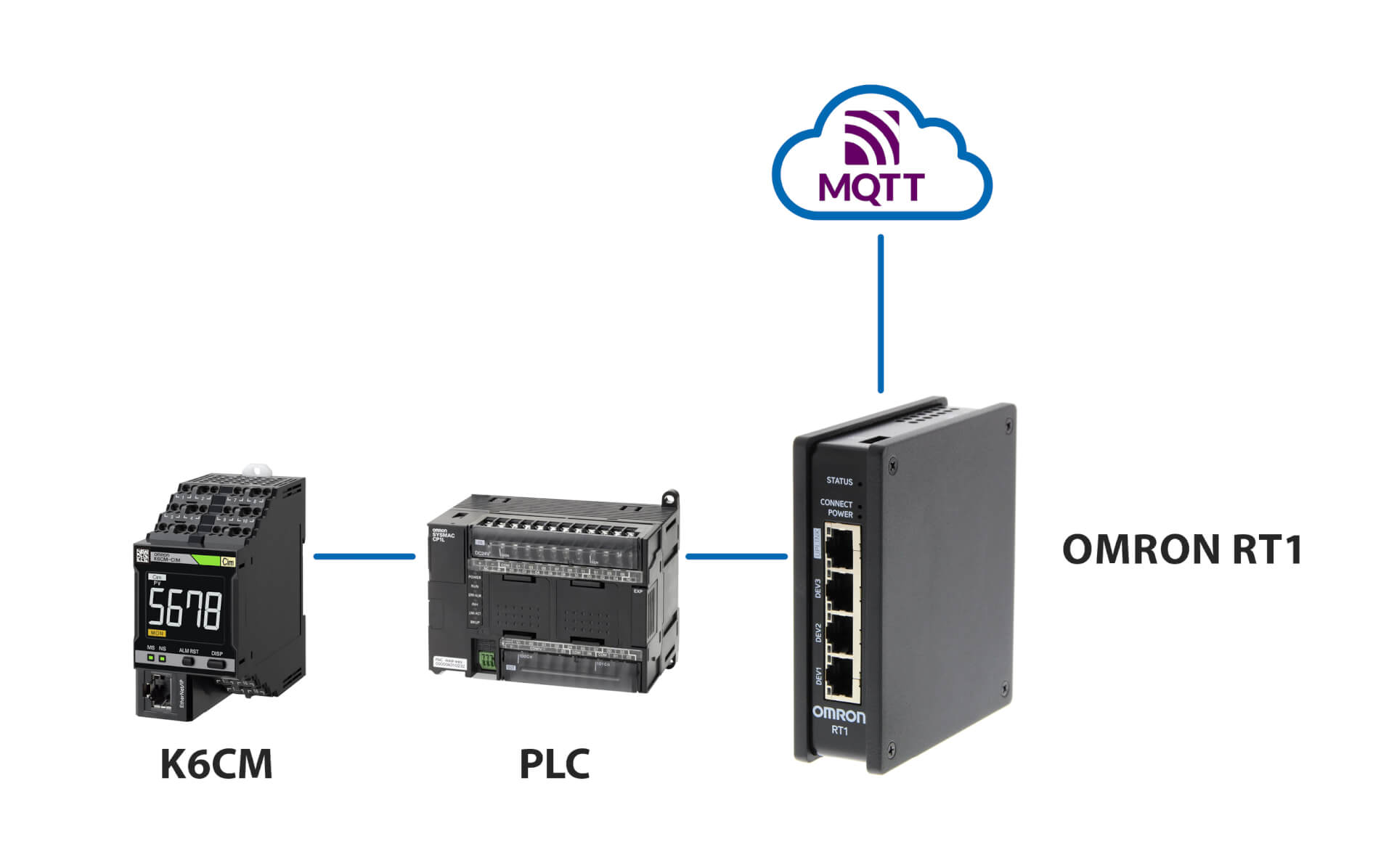
- Interakcja z aplikacjami niestandardowymi i serwerem MQTT
Modele i specyfikacja
Ordering Information
Main Unit
| Power supply voltage | Order code |
|---|---|
| 24 VCD | K6PM-THMD-EIP |
Infrared thermal sensor
| Resolution | Order code |
|---|---|
| 32 × 32 | K6PM-THS3232 |
EtherNet/IP communications cable recommended parts
Use a Category 5 or higher STP cable (shielded twisted pair cable).
Cable with Connectors
| Item | Recommended manufacturer | Cable length (m) | Order code | |
|---|---|---|---|---|
| Wire Gauge and Number of Pairs: AWG26, 4-pair Cable Cable Sheath material: LSZH
2
The lineup features Low Smoke Zero Halogen cables for in-cabinet use and PUR cables for out-of-cabinet use. |
Cable with Connectors on Both Ends (RJ45/RJ45) Standard RJ45 plug type
2
Cables with standard RJ45 plugs are available in the following lengths: 0.2 m, 0.3 m, 0.5 m, 1 m, 1.5 m, 2 m, 3 m, 5 m, 7.5 m, 10 m, 15 m, 20 m.
Cables with rugged RJ45 plugs are available in the following lengths: 0.3 m, 0.5 m, 1 m, 2 m, 3 m, 5 m, 10 m, 15 m.
For details, refer to the Industrial Ethernet Connectors Catalog (Cat. No. G019). Cable color: Yellow
2
Cable colors are available in yellow, green, and blue. The last character of the model changes to "-G" or "-B".
|
OMRON | 0.3 | XS6W-6LSZH8SS30CM-Y |
| 0.5 | XS6W-6LSZH8SS50CM-Y | |||
| 1 | XS6W-6LSZH8SS100CM-Y | |||
| 2 | XS6W-6LSZH8SS200CM-Y | |||
| 3 | XS6W-6LSZH8SS300CM-Y | |||
| 5 | XS6W-6LSZH8SS500CM-Y | |||
| Wire Gauge and Number of Pairs: AWG22, 2-pair Cable |
Cable with Connectors on Both Ends (RJ45/RJ45) Rugged RJ45 plug type
2
Cables with standard RJ45 plugs are available in the following lengths: 0.2 m, 0.3 m, 0.5 m, 1 m, 1.5 m, 2 m, 3 m, 5 m, 7.5 m, 10 m, 15 m, 20 m.
Cables with rugged RJ45 plugs are available in the following lengths: 0.3 m, 0.5 m, 1 m, 2 m, 3 m, 5 m, 10 m, 15 m.
For details, refer to the Industrial Ethernet Connectors Catalog (Cat. No. G019). Cable color: Light blue
|
OMRON | 0.3 | XS5W-T421-AMD-K |
| 0.5 | XS5W-T421-BMD-K | |||
| 1 | XS5W-T421-CMD-K | |||
| 2 | XS5W-T421-DMD-K | |||
| 5 | XS5W-T421-GMD-K | |||
| 10 | XS5W-T421-JMD-K | |||
Cable/Connector
| Part name | Manufacturer | Order code |
|---|---|---|
| Cable | Hitachi Metals, Ltd. | NETSTAR-C5E SA 0.5
× 4P
2
It is recommended to use the cable
and connector in combination described above. |
| RJ45 connector | Panduit Corporation | MPS588-C
2
It is recommended to use the cable
and connector in combination described above. |
Industrial switching hub (recommended parts)
| Recommended manufacturer | Appearance | Specifications | Order code | ||
|---|---|---|---|---|---|
| Function | No. of ports | Failure detection function | |||
| OMRON | ![]() |
Packet priority control (QoS): EtherNet/IP control data priority Failure detection: Broadcast storm, LSI failure detection 10/100BASE-TX, Auto-Negotiation |
3 | Not possible | W4S1-03B |
![]() |
5 | Not possible | W4S1-05B | ||
| 5 | Possible | W4S1-05C | |||
| Cisco Systems, Inc | Consult the manufacturer. https://www.cisco.com/ |
||||
| Contec USA, Inc. | Consult the manufacturer. https://www.contec.com/us/ |
||||
| Phoenix Contact USA | Consult the manufacturer. https://www.phoenixcontact.com/online/portal/pc |
||||
Specifications
Main Unit
Ratings
| Item | K6PM-THMD-EIP | |
|---|---|---|
| Power supply | Power supply voltage | 24 VDC |
| Allowable operating voltage range | 85% to 110% of the power supply voltage | |
| Power supply frequency range | – | |
| Power consumption | 1.6 W max. | |
| Input | Compatible sensor | K6PM-THS3232 |
| Number of connected K6PM sensors | 31 units | |
| Output | Output form | Transistor output |
| Number of outputs | 3 points | |
| Rated voltage | 24 VDC | |
| Maximum current | 50 mA | |
| Ambient operating temperature | –10 to +55 °C (with no condensation or freezing) | |
| Ambient storage temperature | –20 to +65 °C (with no condensation or freezing) | |
| Ambient operating humidity | 25% to 85% (with no condensation) | |
| Storage humidity | 25% to 85% (with no condensation) | |
| Exterior color | Black | |
| Case material | PC UL94-V0 | |
| Altitude | 2,000 m max. | |
| Applicable wires | Stranded wires, solid wires, or ferrules | |
| Applicable wire size | 0.25 to 1.5 mm2 (AWG24 to AWG16) | |
| Wire insertion force | 8 N max. for AWG20 wire | |
| Screwdriver insertion force | 15 N max. | |
| Wire stripping length | 8 mm
2 , 10 mm, 12 mmWithout ferrules. |
|
| Recommended Flat-blade Screwdriver | XW4Z-00B | |
| Current capacity | 10 A (per pole) | |
| Number of insertions | 50 times | |
| Weight | Approx. 200 g | |
| Mounting
2
For
details on mounting on a DIN track and screw attachment, refer to
K6PM Thermal Condition Monitoring Device User's Manual (H231). |
DIN Track mounting | |
| Screw Mounting | ||
| Dimensions | 45 (W) × 90 (H) × 90 (D) mm | |
| Setting method | Communications settings from software tool | |
| Other functions | Display value selection, Main Unit error and K6PM sensor error output, setting parameters initialization, running time |
|
| Accessories | Instruction manual, Software Tool (thermal condition monitoring tool) license number | |
Characteristics
| Item | K6PM-THMD-EIP | ||
|---|---|---|---|
| Temperature measurement range | The temperature measurement range is described in the thermal sensor (K6PM-THS3232) performance. |
||
| Measurement temperature accuracy | The measurement temperature accuracy is described in the thermal sensor (K6PM-THS3232) performance. | ||
| Sampling cycle for the sensor | Approx. 1 second/Unit | ||
| External trigger | External contact input specifications |
Short circuit: Residual voltage 1.5 V or less | |
| Open: Leakage current 0.1 mA or less | |||
| Short circuit current | Approx. 7 mA | ||
| Alarm | Measurement parameters | Current temperature, differential temperature, sensor internal temperature | |
| Expression method | Transistor output, alarm bar display | ||
| Number of variables | Two threshold values per segment (Threshold 1 and Threshold 2) | ||
| Threshold setting range | 0.0 to 999.9°C (0.0 to 999.9°F) | ||
| Hysteresis | 3.0°C width (5.4°F width) | ||
| Resetting method | Manual resetting
2 or automatic resetting
(switching)Manual resetting method:
Press and hold the SEG/ALM RST Button. |
||
| LCD display | 7-segment digital displays and individual indicators | ||
| Display resolution | 0.1°C | ||
| Applicable standards | Approved standards | UL61010-1 (Listing) installation location: Pollution level 2, South Korean Radio Law | |
| Conforming standards | RCM | ||
| EMC | EN61326-1 (EMI: Class A EMS: Industrial Location) | ||
| Recommended fuse | T2A, time lag, high shut-off capacity | ||
| Insulation resistance | 20 MΩ min. Between all external terminals and the case Between all power supply terminals and all other terminals Between all RS-485 communications terminals, and all external trigger input terminals, all transistor output terminals and all Ethernet ports |
||
| Dielectric strength | 2,000 VAC for 1 minute Between all external terminals and the case Between all power supply terminals and all other terminals Between all RS-485 communications terminals, and all external trigger input terminals, all transistor output terminals and all Ethernet ports |
||
| Vibration resistance | Frequency: 10 to 55 Hz, 0.35-mm single amplitude in X, Y, and Z directions (10 sweeps of 5 min each) | ||
| Shock resistance | 150 m/s2, 3 times each in X, Y, and Z axes, 6 directions | ||
| Degree of protection | IP20 | ||
| Warranty period | 1 year | ||
| Indicators | Alarm bar | Red, yellow, and green | |
| MS and NS | Red and green | ||
| Ethernet Communicaitons | Supported services | EtherNet/IP (tag data link or CIP message communications) BOOTP client Modbus TCP |
|
| Physical layer | 100 Base-TX | ||
| Transmission specifications |
Transmission speed | 100 Mbps | |
| Transmission medium | Twisted pair cable (with shield: STP): Category 5 or higher | ||
| Transmission distance | 100 m max. (distance between hub and node) | ||
| Tag data link | Class1 | Supported. | |
| Connection resource | 4 | ||
| Packet interval (RPI) | 1,000 to 10,000 ms | ||
| Timeout value | Multiples of RPI (4 times, 8 times, 16 times, 32 times, 64 times, 128 times, 256 times, 512 times) | ||
| Connection type | Point To Point Connection (fixed) | ||
| Explicit message | Class 3 | Supported | |
| UCMM | Supported | ||
| Number of clients that can communicate at one time with UCMM |
2 | ||
| Modbus TCP | Number of clients that can be connected simultaneously |
2 | |
| Factory default values | IP address | 192.168.250.30 | |
| Subnet mask | 255.255.255.0 | ||
| The default gateway | 0.0.0.0 | ||
| IP address setting method | Static IP address | ||
Indicator
| Symbol | Name | Color | Status | Operating condition |
|---|---|---|---|---|
| MS | Module Status | Green | Lit. | Normal status |
| Red | Lit. | One of the following fatal errors (Main Unit
internal error)
|
||
| Flashes at 1-s intervals. | One of the following conditions
|
|||
| – | Not lit. | No power supply | ||
| NS | Network Status | Green | Lit. | Tag data link or message connection established |
| Flashes at 1-s intervals. | No tag data link or message connection established | |||
| Red | Lit. | IP address duplication status | ||
| Flashes at 1-s intervals. | The connection has timed out, or the BOOTP server connection error state | |||
| – | Not lit. | No power supply |
Transistor output
| Name | Description | |
|---|---|---|
| Transistor Output 1 | Threshold 1 excess output of comprehensive alarm. | If threshold 1 exceeded occurs for the comprehensive alarm, transistor output 1 remains OFF and transistor output 2 remains ON.If threshold 2 exceeded occurs for the comprehensive alarm, both transistor output 1 and transistor output 2 turn OFF. (Normally closed type) |
| Transistor output type can be set to Normally Closed or Normally Open. | ||
| Transistor Output 2 | Threshold 2 excess output of comprehensive alarm. Transistor output type can be set to Normally Closed or Normally Open. |
|
| Transistor Output 3 | Main Unit error and K6PM-TH sensor error output
2
The
Main Unit error and K6PM-TH sensor error specify any one of the
following:
|
2 The operation of transistor output 3 is
as described below. |
| Status | Transistor output 3 | |
|---|---|---|
| Status of Main Unit | Status of infrared thermal sensor | |
| Operating | OFF | |
| Main Unit internal error | ||
| In monitoring mode | Before data acquisition | ON |
| Normal | ||
| K6PM-TH sensor communications error or sensor type error | OFF | |
| The detection of the K6PM-TH sensor angle deviation | ||
| Temperature measurement range exceeded | ||
| Running time error | ||
| K6PM-TH sensor search mode or K6PM-TH sensor position adjustment mode |
Before data acquisition | ON |
| Normal | ||
| K6PM-TH sensor communications error or sensor type error | ||
| The detection of the K6PM-TH sensor angle deviation | ||
| Temperature measurement range exceeded | ||
| Running time error | OFF | |
Measured value display
| Measurement level | Methods for checking | ||
|---|---|---|---|
| Main Unit (display) | Software tool | Communicaitons | |
| Temperature of each segment and sensor internal temperature |
The segment display of each sensor can be switched on the Main Unit front-panel. |
Can be checked on the Monitoring sensor screen. |
|
| Differential temperature per segment from the K6PM-TH sensor internal temperature |
Not supported | Not supported | Not supported |
| Temperature of each infrared thermal sensor |
Not supported | The past maximum value can be monitored on the Monitoring K6PM screen. |
Not supported |
| Temperature of each pixel | Not supported | The temperature can be displayed when the cursor is placed on the thermal image on the Monitoring sensor screen. |
|
| Alarms of each Main Unit (Alarms of all infrared thermal sensors connected to the Main Unit) |
The occurrence of an alarm can be checked on the alarm bar. |
The occurrence of an alarm can be checked on the Device List of K6PM screen. |
The occurrence of an alarm can be checked from the Main Unit status. |
Infrared thermal sensor
Ratings
| Item | K6PM-THS3232 | |
|---|---|---|
| Power supply | Power supply voltage | 24 VDC |
| Allowable operating voltage range | 85% to 110% of the power supply voltage | |
| Power supply frequency range | – | |
| Power consumption | 0.4 W max./Unit at 24 VDC
2
The power consumption
increases according to the number of connected devices. Take note
of the choice of wiring and the wiring diameter. |
|
| Ambient operating temperature | –10 to +55 °C (with no condensation or freezing) | |
| Storage temperature | –20 to +65 °C (with no condensation or freezing) | |
| Ambient operating humidity | 25% to 85% (with no condensation) | |
| Storage humidity | 25% to 85% (with no condensation) | |
| Exterior color | Black | |
| Case material | PC UL94-V0 | |
| Altitude | 2,000 m max. | |
| Applicable wires | Stranded wires or solid wires | |
| Applicable wire size | 0.25 to 1.5 mm2 (AWG24 to AWG16) | |
| Current capacity | 8 A (per pole) | |
| Weight | 50 g max. | |
| Mounting | Mounting
2
A 1/4-20 UNC mounting hole is available (nuts are not provided). Screw Mounting |
|
| Dimensions | 43 × 60 × 25.1 mm (W×H×D) Terminals not included | |
| Accessories
2
The
pan head is sold separately. |
Instruction manual, mounting bracket, magnet
(for positioning)
2
Use magnet mounting for positioning the sensor. |
|
Performance
| Item | K6PM-THS3232 | |
|---|---|---|
| Temperature measurement | Temperature measurement range | Temperature measurement range: 0.0°C to 200.0°C (32.0°F to 392.0°F) |
| Detection resolution | 32 × 32 (1,024 pixels) | |
| Temperature accuracy | ±5°C (at an ambient temperature of 25°C)
2
Accuracy
may vary depending on the measured distance, the object's emissivity,
and ambient temperature.
2
For details
on temperature accuracy and reproducibility, refer to K6PM Thermal
Condition Monitoring Device User's Manual (H231). |
|
| Emissivity | 0.94 | |
| Reproducibility | 1°C (at an ambient temperature of 25°C)
2
For details
on temperature accuracy and reproducibility, refer to K6PM Thermal
Condition Monitoring Device User's Manual (H231). |
|
| Temperature drift | 0.15°C | |
| Viewing angle [FOV] | 90° × 90° | |
| Warmup time | 15 minutes | |
| Other functions | Over temperature measurement range | Temperature: 200.0°C or higher, sensor internal temperature: 80°C or higher |
| Angle deviation detection
2
Make
ON/OFF settings on the DIP switch Pin 2 (default value: OFF).
Since the operation is not stable at a location subject to vibrations,
it may not be possible to detect angle deviation. |
Angle deviations of 5° (typ) min. and those that continue for 3 seconds min. can be detected. | |
| Output | Communications method | RS-485 communications |
| Maximum cable length | 500 m | |
| Applicable standards | Approved standards | UL61010-1 (listing) installation location: Pollution degree 2 |
| Korean Radio Waves Act | ||
| Conforming standards | RCM | |
| EMC | EN61326-1 (EMI: Class A EMS: Industrial Location) Measured temperature fluctuation range: ±6°C |
|
| Recommended fuse | T2A, time lag, high shut-off capacity | |
| Insulation resistance | 20 MΩ min. Between all terminals and the case |
|
| Dielectric strength | 1,000 VAC for 1 minute Between all terminals and the case |
|
| Vibration resistance | Frequency: 10 to 55 Hz, 0.35-mm single amplitude
in X, Y, and Z directions (10 sweeps of 5 min each)
2
During screw mounting. |
|
| Shock resistance | 150 m/s2, 3 times each in 6 directions
along 3 axes
2
During screw mounting. |
|
| Degree of protection | IP20 | |
| Indicators | Power indicator | Green (when power is on: lit, when power is not on: off) |
| Communications indicator | Orange (when communications are performed: Lit, when communications are not performed: Not lit) | |
| Alarm indicator | Red (when a sensor error occurs: Lit, when an angle deviation is detected: Flashing) | |
Software tool
| Item | Specification | |
|---|---|---|
| Project | Number of files that can be created | No limit |
| Sampling cycle of infrared thermal sensor: 1 to 99 | 1 to 99 minutes, or 1 to 99 hours (default value: 1 minute) | |
| Logging | Supported file format | Tab-delimited text file format |
| Measurement interval | Sampling cycle | |
| Log file unit | A new file for every 1,440 rows (excluding the header) regardless of the sampling interval | |
| 1 Number that can be registered in the project |
Number of Main Unit | 5 Units max. |
| Files to create | The following are created in the installation
folder \cfg:
|
|
| Photo image file format that can be read and displayed | JPG/JPEG format | |
| Temperature alarm threshold automatic setting | Supported | |
Details of the file to be created
| File type | Extension | Description | Save position by default |
|---|---|---|---|
| Project file | .ini | Text file including the following:
|
C:\Program Files\OMRON\Thermal Condition Monitoring Tool\cfg |
| Configuration file | .ini | Text file including the following (file name
= fixed as "app.ini"):
|
C:\Program Files\OMRON\Thermal Condition Monitoring Tool\cfg |
| Log file | .txt | A file is created for each Main Unit. It is text file format, so it can be used by other applications. |
The log file location is as follows: C:\Program Files\OMRON\Thermal Condition Monitoring Tool\ log\[Main Unit number (2 digits)] |
Operating Environment of the Software tool
| Item | Description |
|---|---|
| OS | Windows 7, Windows 8.1, Windows 10 (32 bit/64 bit) (JP/EN) |
| CPU | 2.4 GHz or more, 32 bit or 64 bit processor |
| Memory | 4 GB min. |
| Disk reserved area capacity | 64 GB min. |
| Monitor resolution | 1024 × 768 (XGA), High Color 16 bit or more |
| .NET Framework | . NET Framework 4.7.2
2
The operation requires .NET Framework 4.7.2. Download the software tool from the OMRON website as follows: https://www.ia.omron.com/k6pm_tool |
| Others | LAN port: For network connection |
Potrzebujesz pomocy?
Jesteśmy tu, aby Ci pomóc! Skontaktuj się z nami, a nasi specjaliści pomogą Ci znaleźć najlepsze rozwiązanie dla Twojej firmy.
Proszę o kontakt K6PM-TH
Dziękujemy za wysłanie zapytania. Otrzymasz od nas odpowiedź tak szybko, jak to tylko będzie możliwe.
Problem techniczny. Akcja nie została wykonana. Przepraszamy - spróbuj ponownie.
DownloadOferta dla K6PM-TH
Poniżej możecie Państwo wysłać zapytanie cenowe dotyczące naszych produktów. Prosimy wypełnić wszystkie pola oznaczone *. Twoje dane osobowe będą oczywiście traktowane jako poufne.
Dziękujemy za zlecenie wyceny. Dostarczymy Ci niezbędnych informacji tak szybko, jak to tylko będzie możliwe.
Problem techniczny. Akcja nie została wykonana. Przepraszamy - spróbuj ponownie.
DownloadFeature
K6PM jest niezawodnym partnerem do monitorowania krytycznych paneli placówki, a także paneli urządzeń przez cały okres ich eksploatacji (rozwój, walidacja, FAT i po instalacji).
Nadaje się w szczególności do zastosowań, w których panel znajduje się tuż obok maszyny generującej intensywne ciepło (piece, piekarniki, maszyny do formowania).
Urządzenia do monitorowania stanu można skonfigurować za pomocą jednego narzędzia
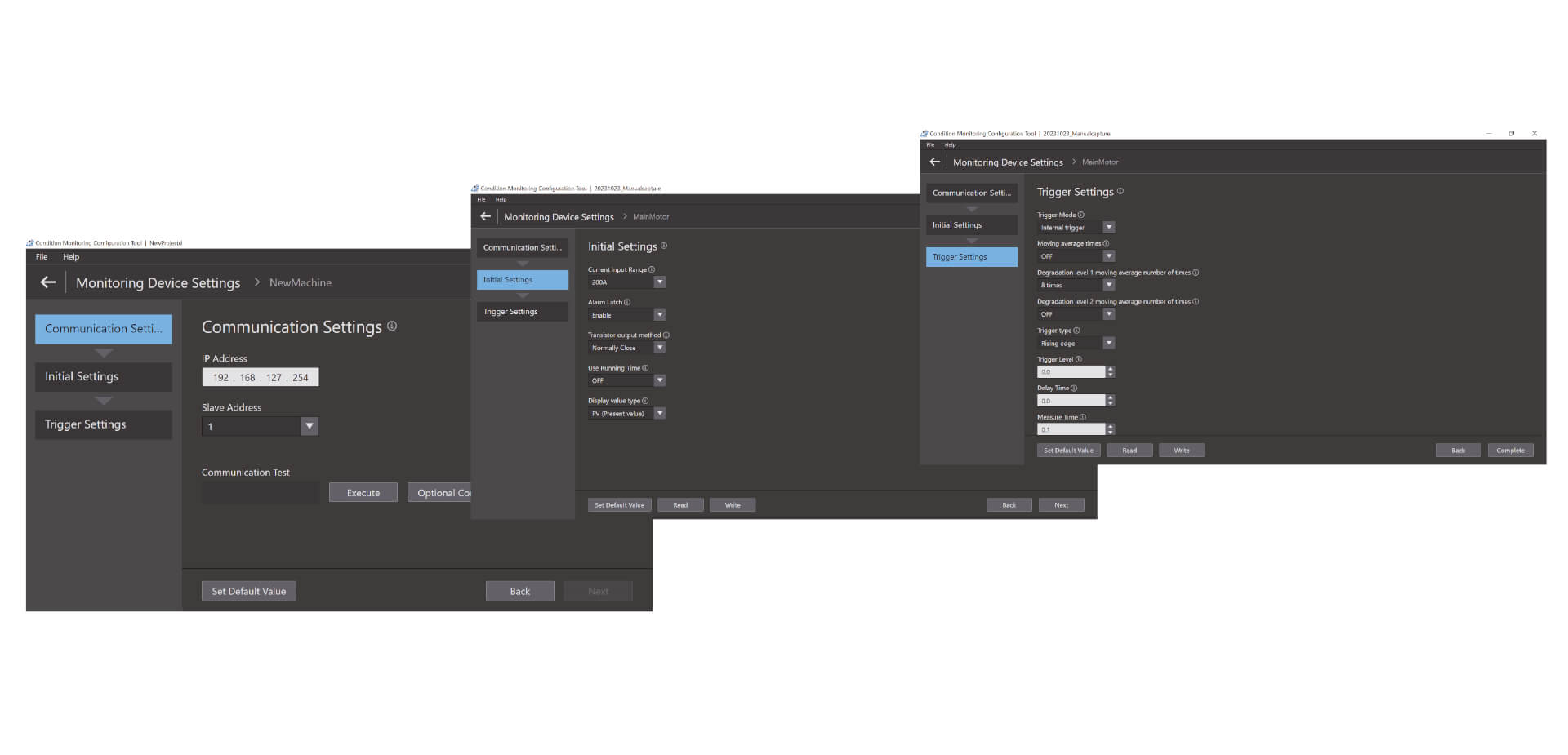
Łatwa konfiguracja w trzech krokach Narzędzie do konfiguracji monitorowania stanu umożliwia konfigurację wsadową szerokiej gamy urządzeń do monitorowania stanu, na przykład silników, temperatury, izolacji i elementów grzejnych. Do jego obsługi nie są wymagane żadne specjalne umiejętności, co zmniejsza wysiłek poświęcony na szkolenie.
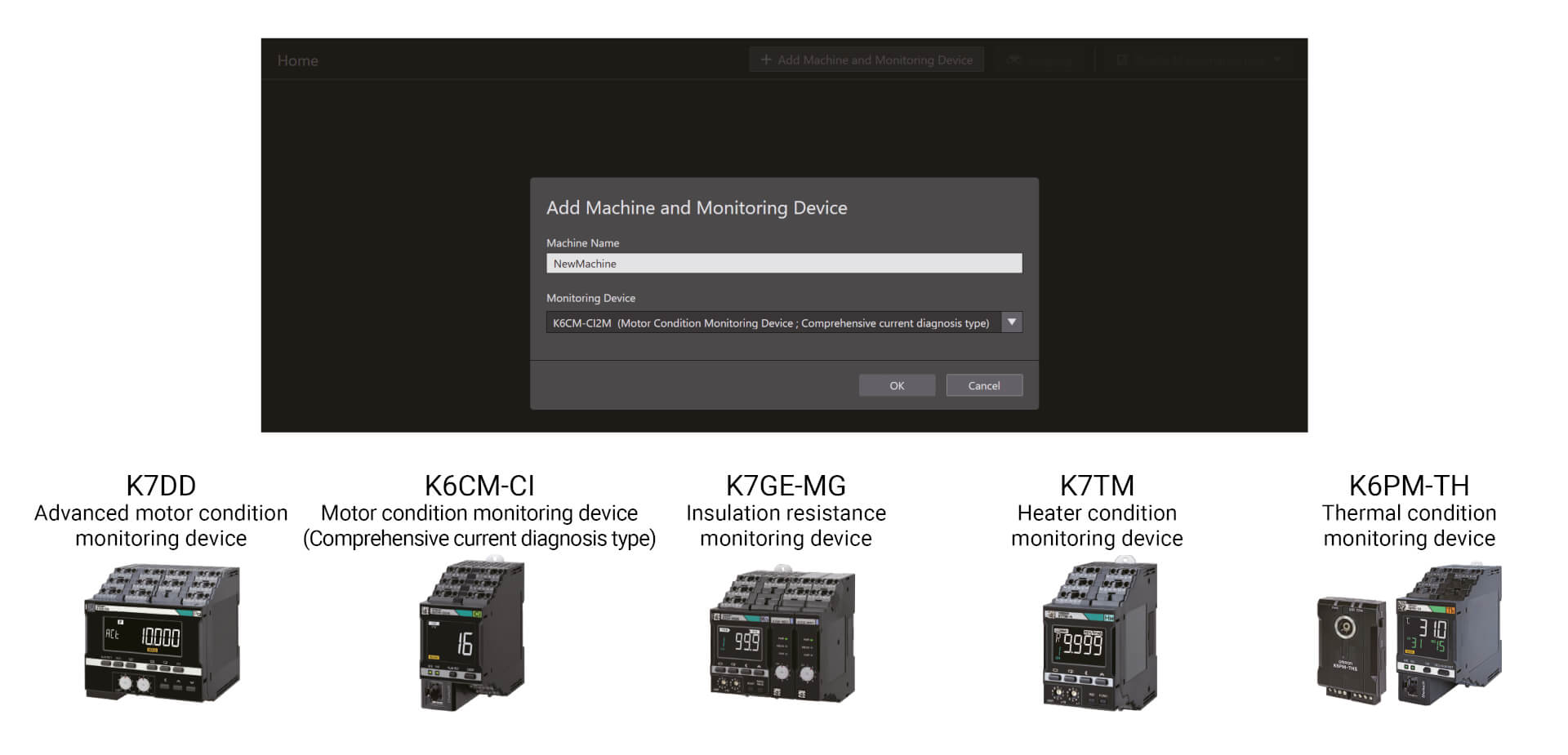
Łatwa konfiguracja w trzech krokach
Narzędzie do konfiguracji monitorowania stanu umożliwia konfigurację wsadową szerokiej gamy urządzeń do monitorowania stanu, na przykład silników, temperatury, izolacji i elementów grzejnych. Do jego obsługi nie są wymagane żadne specjalne umiejętności, co zmniejsza wysiłek poświęcony na szkolenie. Konfigurację można ukończyć w zaledwie trzech krokach, są to: konfiguracja komunikacji, wstępna konfiguracja i konfiguracja wyzwalania. *1 Dzięki wysokiemu poziomowi funkcjonalności narzędzie zwiększa również wydajność w zakładzie.
Filmy
-
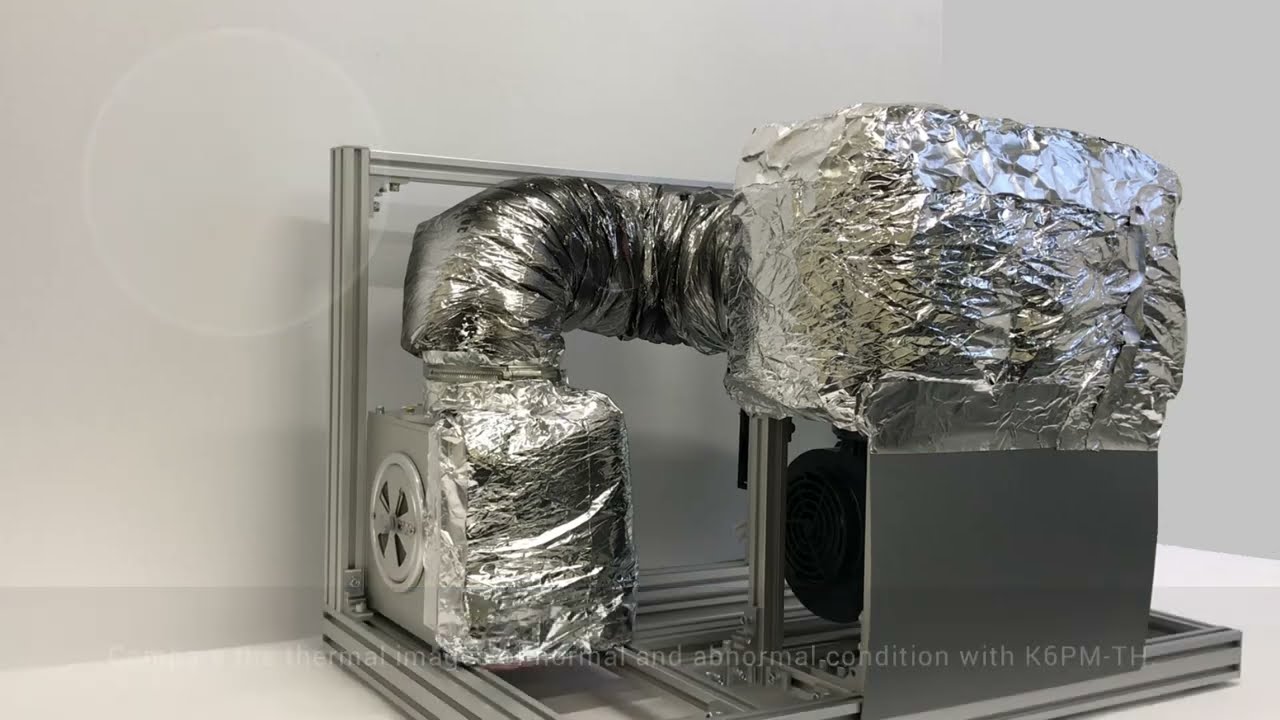
OMRON K6PM-TH Thermal Condition Monitor Detecting Dryer Duct Leak
Coating and drying is one of the most dangerous processes in car manufacturing. In the drying oven, air heated to 400°C in the combustion chamber travels through the air duct for use in drying. These air ducts degrade over time, sometimes allowing air hotter than 100°C to leak, which can lead to burn injuries during patrol inspection. #omronindustrialautomation #MakeitOMRON
02:59
OMRON K6PM-TH Thermal Condition Monitor Detecting Dryer Duct Leak
Coating and drying is one of the most dangerous processes in car manufacturing. In the drying oven, air heated to 400°C in the combustion chamber travels through the air duct for use in drying. These air ducts degrade over time, sometimes allowing air hotter than 100°C to leak, which can lead to burn injuries during patrol inspection. #omronindustrialautomation #MakeitOMRON
-
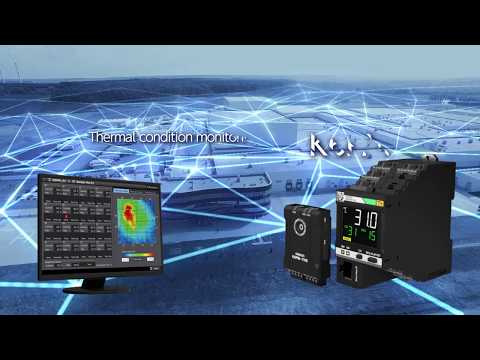
K6PM: Innovation in thermal monitoring and panel maintenance
Parts to check are increasing as devices and wires in a panel increase for high-functioned facilities and equipment. On the other hand, maintenance frequency is decreasing due to shortage of the maintenance engineers, resulting in a higher risk of accident. There are various causes of failures on the device. Current methods of manual inspections are useful but they only provide limited amount of failure detection information. Here is a new solution from OMRON.
02:37
K6PM: Innovation in thermal monitoring and panel maintenance
Parts to check are increasing as devices and wires in a panel increase for high-functioned facilities and equipment. On the other hand, maintenance frequency is decreasing due to shortage of the maintenance engineers, resulting in a higher risk of accident. There are various causes of failures on the device. Current methods of manual inspections are useful but they only provide limited amount of failure detection information. Here is a new solution from OMRON.
-
Omron K6PM "Auto threshold set" algorithm
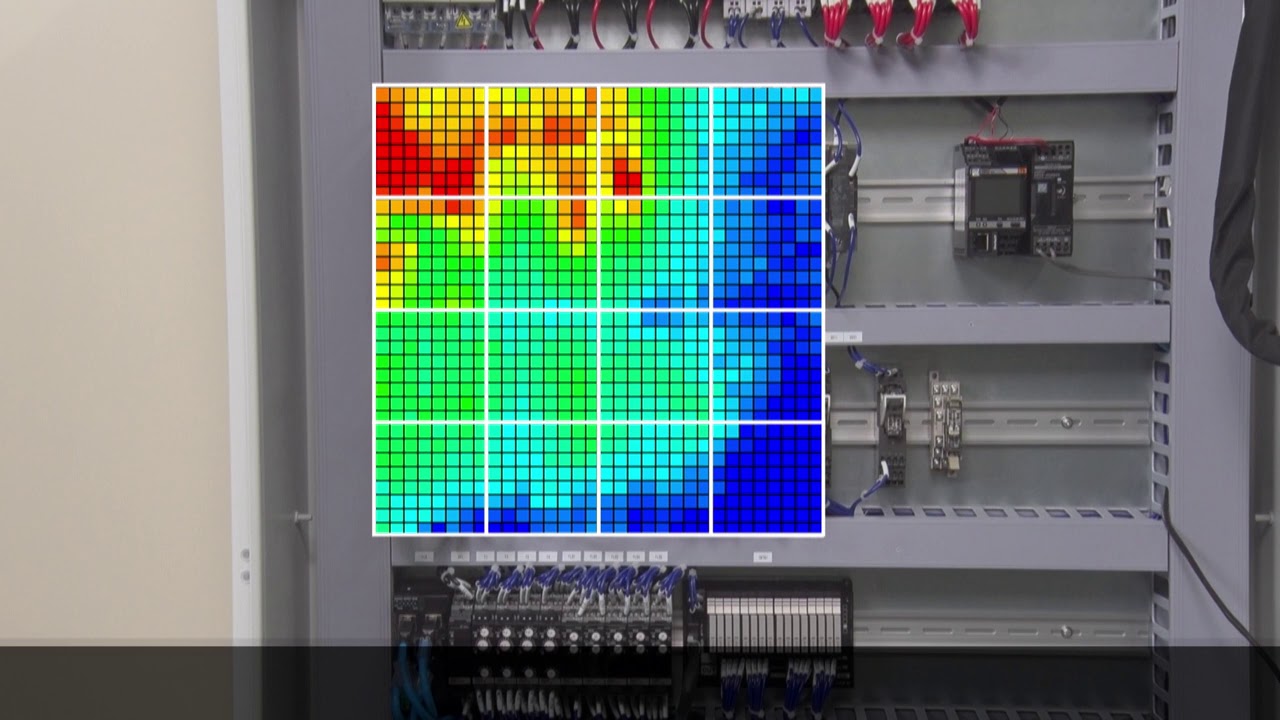
The amount of heat generated varies from device to device. For this reason, the optimum threshold value for the thermal monitoring must be set depending on the device. K6PM can divide one sensor monitoring area into 16 segments and automatically set the threshold for each segment.
01:27
Omron K6PM "Auto threshold set" algorithm
The amount of heat generated varies from device to device. For this reason, the optimum threshold value for the thermal monitoring must be set depending on the device. K6PM can divide one sensor monitoring area into 16 segments and automatically set the threshold for each segment.
-
Omron K6PM "Differential temperature detection" algorithm
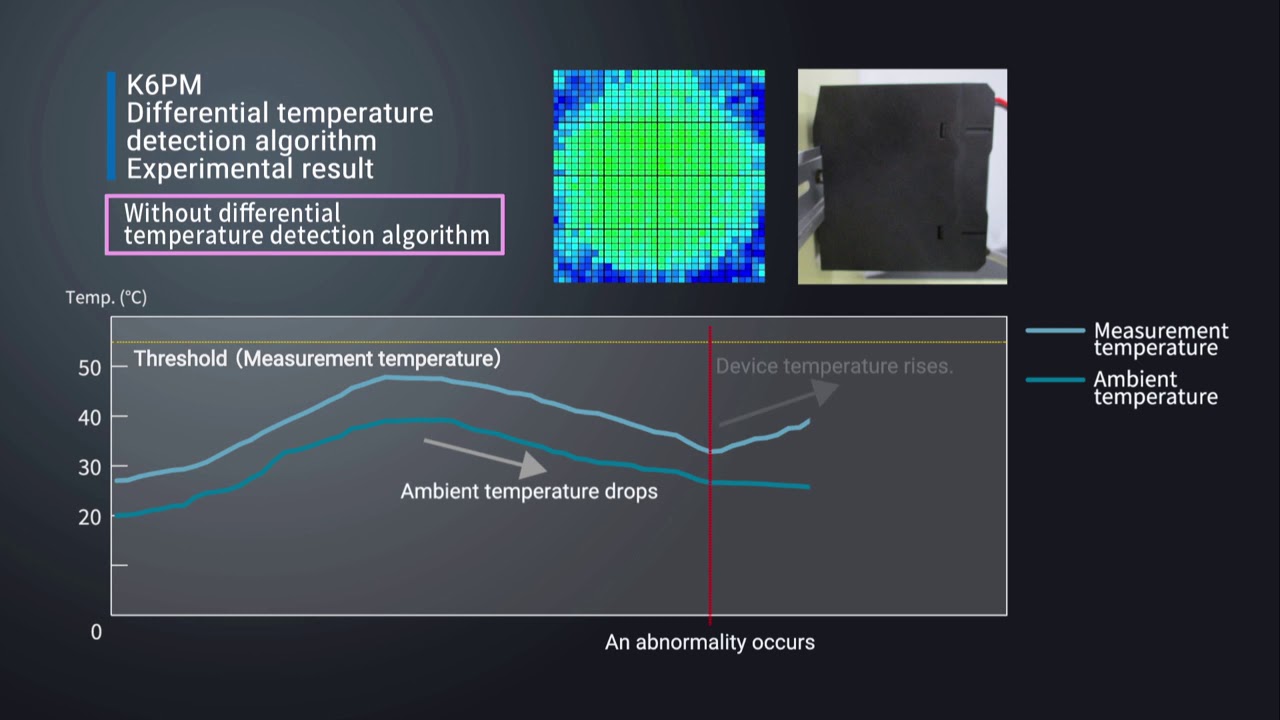
For applications where there are fluctuations in ambient temperature, it can be difficult to determine the cause of the temperature change of the device. The K6PM constantly monitors the difference between measure temperature and ambient temperature. This allows the K6PM to accurately detect abnormalities without being affected by ambient temperatures.
01:51
Omron K6PM "Differential temperature detection" algorithm
For applications where there are fluctuations in ambient temperature, it can be difficult to determine the cause of the temperature change of the device. The K6PM constantly monitors the difference between measure temperature and ambient temperature. This allows the K6PM to accurately detect abnormalities without being affected by ambient temperatures.
-
Omron K6PM "Arrival prediction" algorithm
Predicts the estimated temperature value based on the temperature rise trend. With the Predictive temperature algorythm, you can quickly identify potential risks before they ccould lead failures and machine downtime. Watch a testing example.
01:52
Omron K6PM "Arrival prediction" algorithm
Predicts the estimated temperature value based on the temperature rise trend. With the Predictive temperature algorythm, you can quickly identify potential risks before they ccould lead failures and machine downtime. Watch a testing example.
-
Installation procedure of thermal image sensor (K6PM-THS) in the panel
Watch the installation video for a smooth integration of the K6PM.
02:33
Installation procedure of thermal image sensor (K6PM-THS) in the panel
Watch the installation video for a smooth integration of the K6PM.Rozwiązania
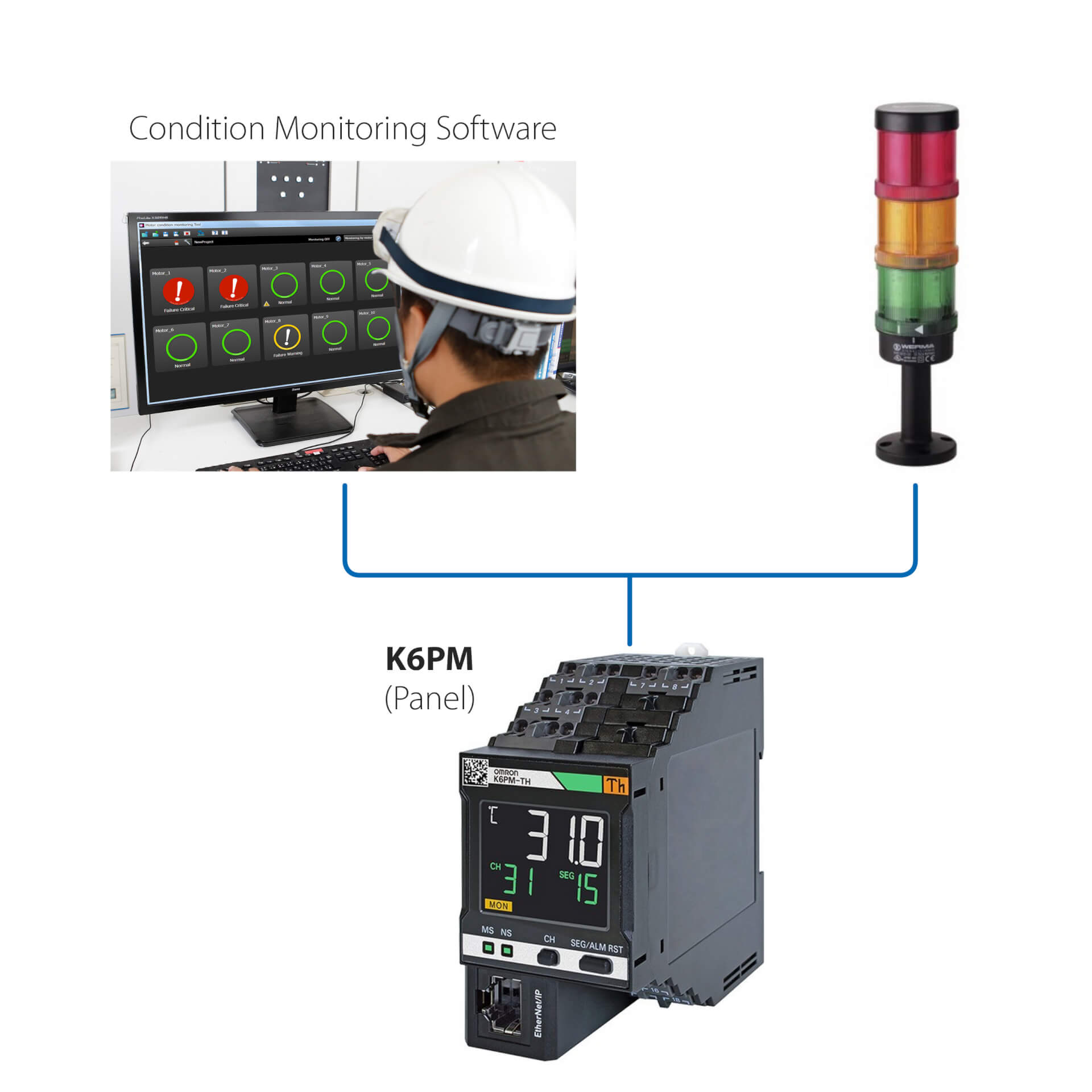
Instalacja autonomiczna (bez sterownika PLC)
To proste rozwiązanie umożliwia:
- Monitorowanie stanu silnika za pomocą wbudowanej diody LED lub poprzez oprogramowanie do monitorowania stanu
- Konfigurowanie sterowników za pomocą oprogramowania do monitorowania stanu dostarczonego z urządzeniem
- Korzystanie z interfejsu urządzenia K6PM z zewnętrznymi urządzeniami we/wy (wyjście cyfrowe)
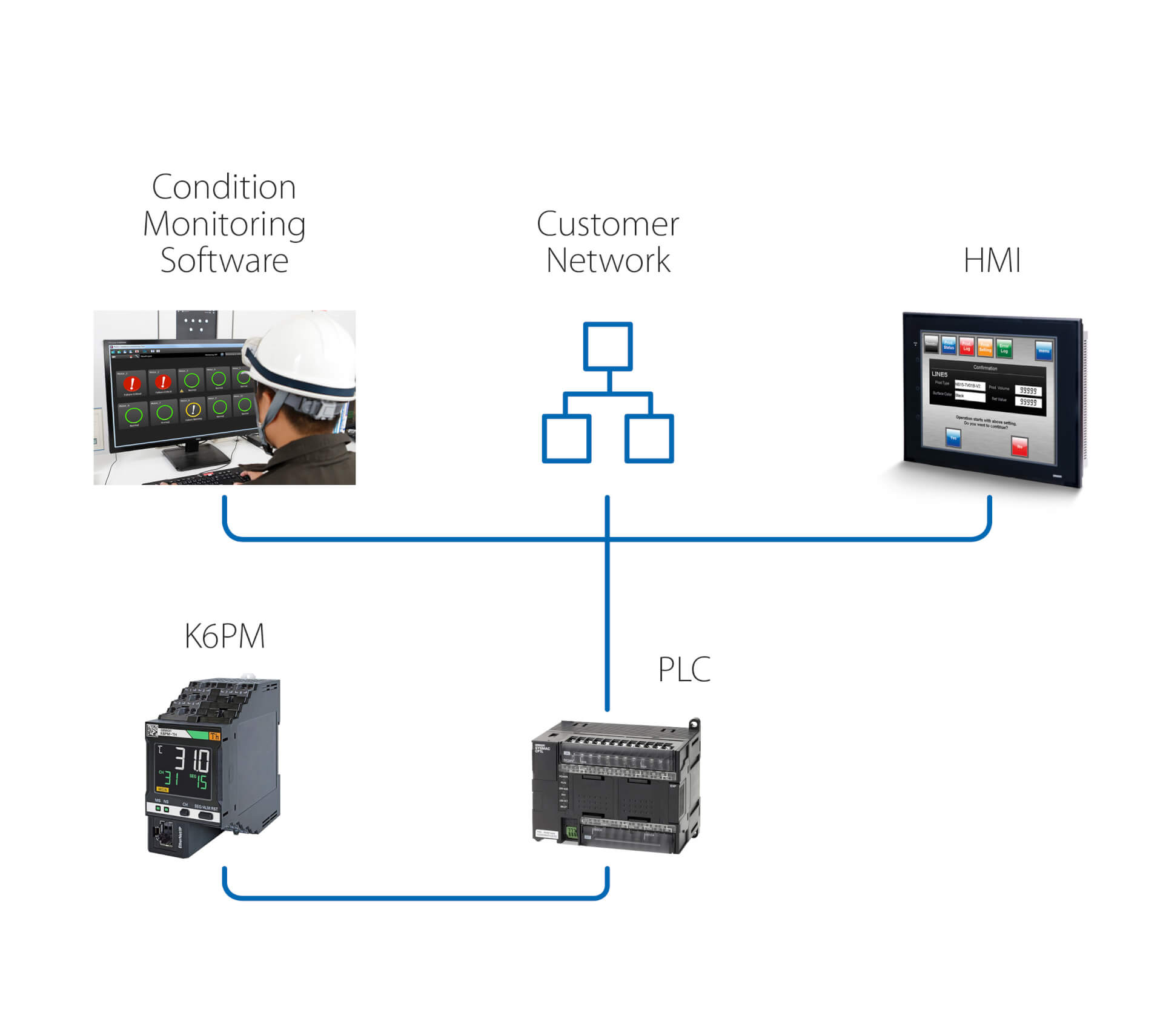
Instalacja autonomiczna (ze sterownikiem PLC)
Rozwiązanie zapewnia dodatkowe funkcje względem poprzedniej wersji:
- Monitorowanie stanu silnika poprzez oprogramowanie do monitorowania stanu, działające na komputerze PC, który jest podłączony za pomocą sterownika PLC
- Używanie zdalnego połączenia PLC do uzyskania dostępu do urządzenia K6PM w celu zdalnego monitorowania i konfiguracji
- Wywoływanie za pomocą sterownika PLC działania po każdym ostrzeżeniu/alarmie wykrytym przez K6PM
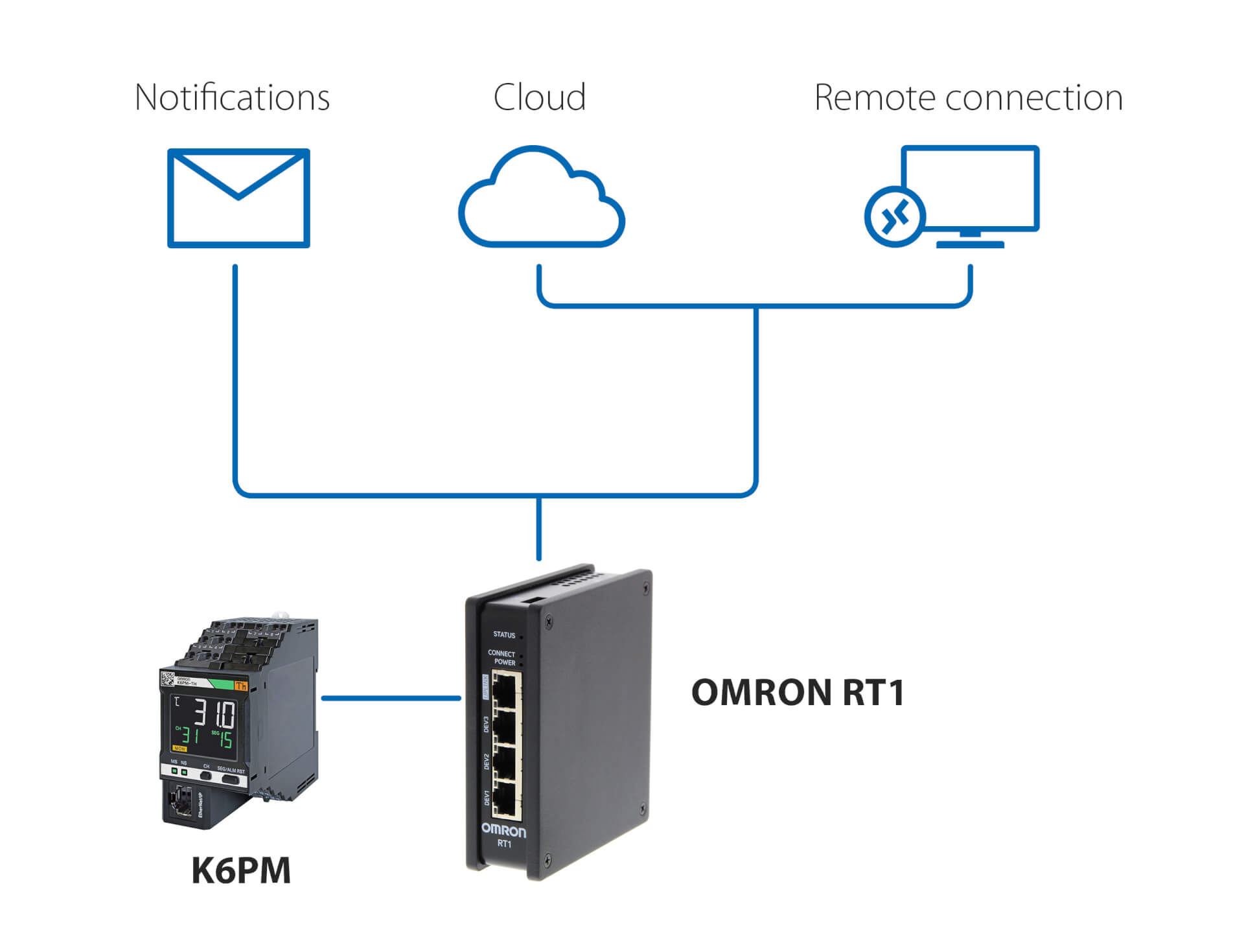
Powiadomienia i zdalne monitorowanie – bez sterownika PLC
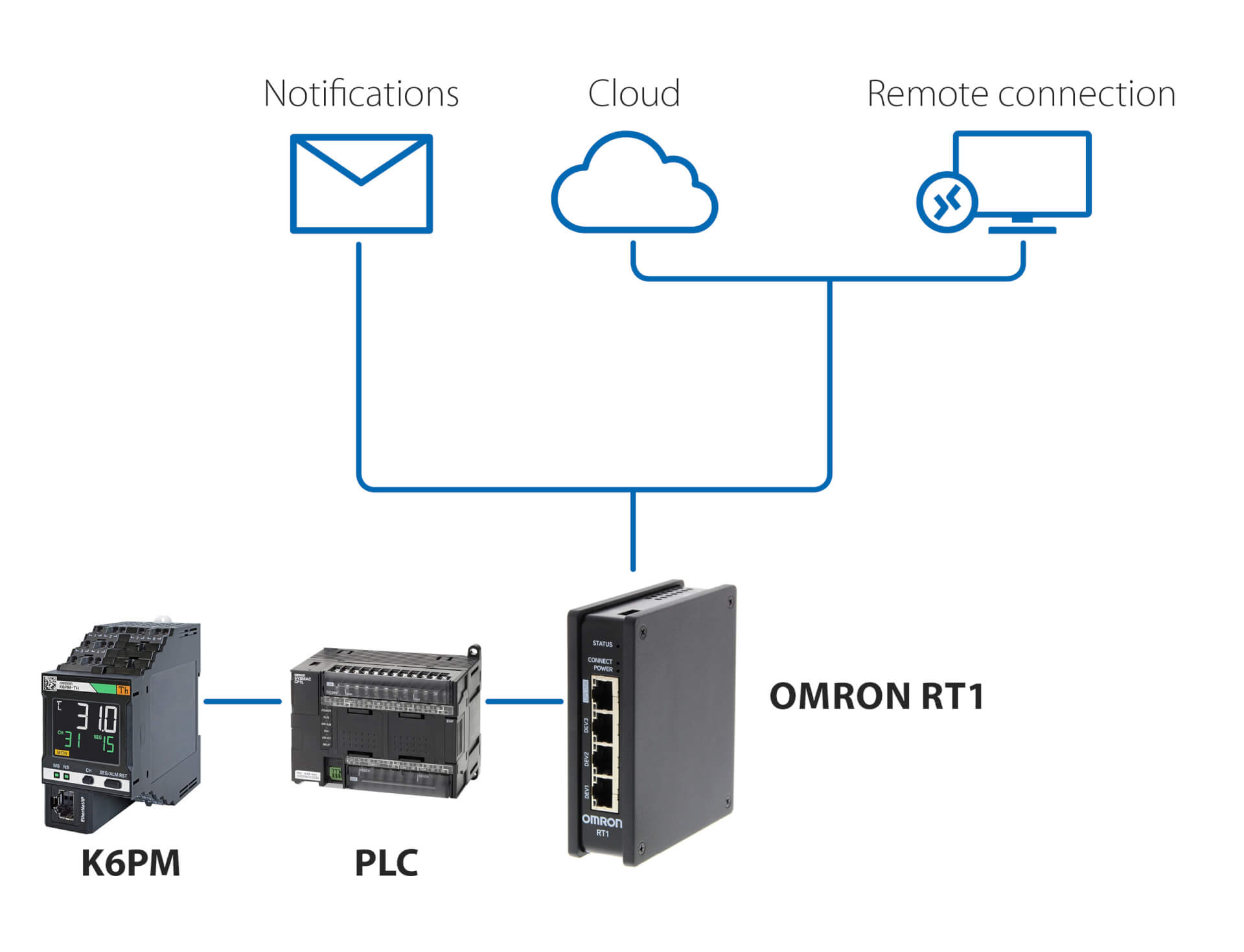
To rozwiązanie, wykorzystujące Omron RT1 jako bramę, umożliwia:
- Korzystanie z powiadomień e-mail/SMS w przypadku wykrycia nieprawidłowości przez K6PM
- Bezpieczne połączenie (zarządzane przez RT1) z chmurą, za pośrednictwem sieci LAN lub połączenia 4G
- Bezpieczne połączenie do zdalnego monitorowania i konfiguracji K6PM za pomocą oprogramowania do monitorowania stanu dostarczonego ze sterownikiem
Powiadomienia i zdalne monitorowanie – ze sterownikiem PLC
To rozwiązanie, wykorzystujące dowolny sterownik PLC i Omron RT1 jako bramę, umożliwia:
- Korzystanie z powiadomień e-mail/SMS w przypadku wykrycia nieprawidłowości przez K6PM
- Bezpieczne połączenie (zarządzane przez RT1) z chmurą, za pośrednictwem sieci LAN lub połączenia 4G
- Bezpieczne połączenie do zdalnego monitorowania i konfiguracji K6PM za pomocą oprogramowania do monitorowania stanu dostarczonego ze sterownikiem